# Consulter les données cadastrales

# Comment afficher les comptes-propriétaires ?

La couche **Compte propriétaire** disponible dans le thème <span style="color: #007bae;">Cadastre </span>vous permet de visualiser en couleur les parcelles appartenant à un même compte propriétaire.

[![](https://www.geo64.fr/wp-content/uploads/2026/03/cp1-1024x447.png)](https://www.geo64.fr/wp-content/uploads/2026/03/cp1.png)
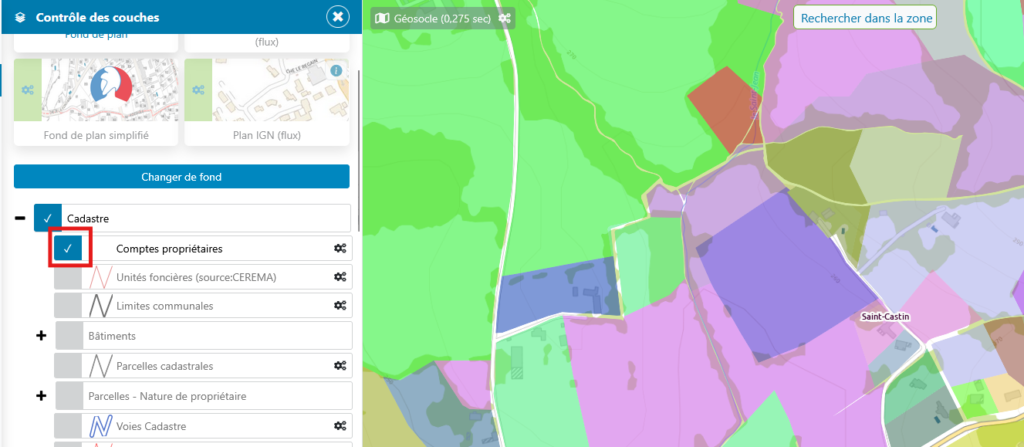
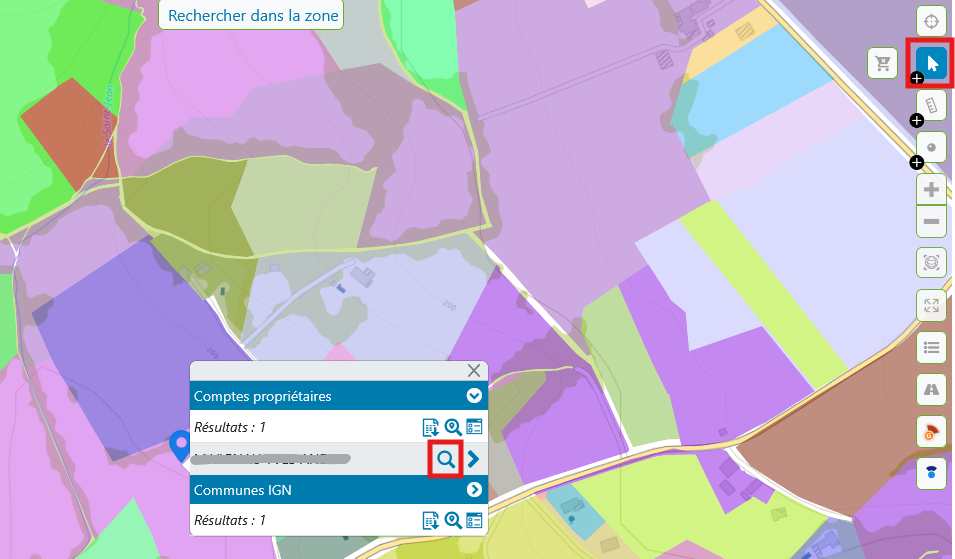
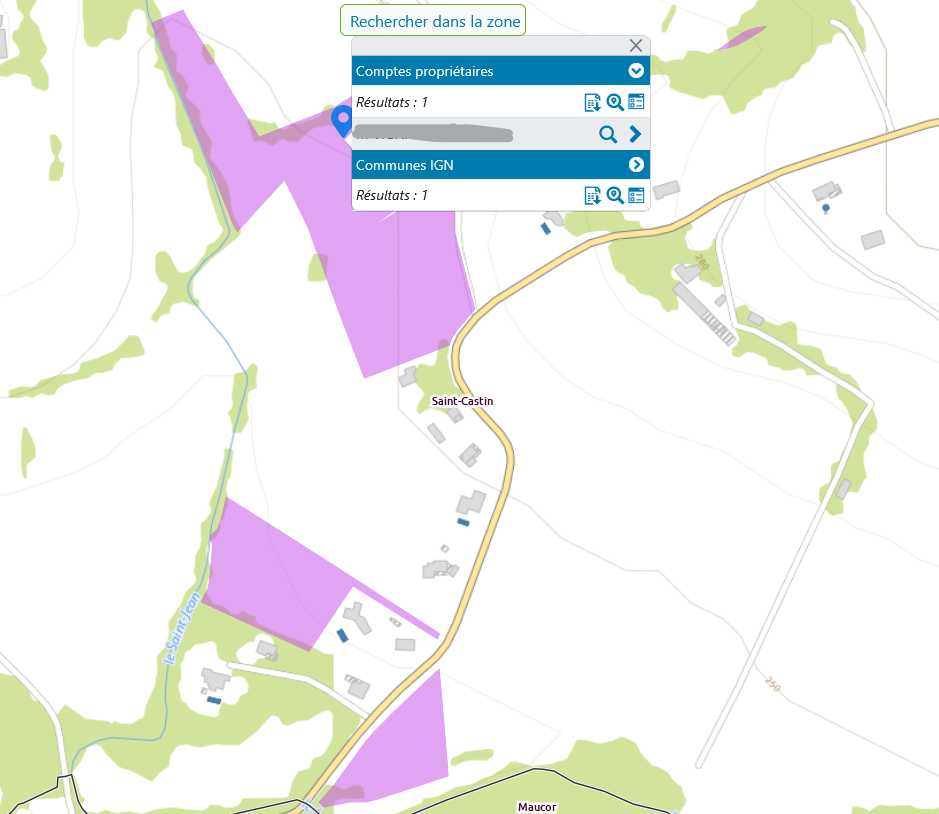
Pour afficher l’ensemble des parcelles d’un même propriétaire, sélectionnez-en une à l’aide de l’outil de sélection puis cliquez sur la loupe : les autres parcelles s’estompent afin de mettre en évidence celles du compte choisi.

[![](https://www.geo64.fr/wp-content/uploads/2026/03/cp2.png)](https://www.geo64.fr/wp-content/uploads/2026/03/cp2.png)
[![](https://www.geo64.fr/wp-content/uploads/2026/03/cp3.png)](https://www.geo64.fr/wp-content/uploads/2026/03/cp3.png)
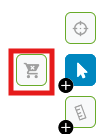
Pour revenir à l’affichage initial, cliquez sur l’outil de désélection.

[![](https://www.geo64.fr/wp-content/uploads/2026/03/cp4.png)](https://www.geo64.fr/wp-content/uploads/2026/03/cp4.png)
# Comment rechercher par nom de propriétaire ?

<span style="font-size: 11.0pt; font-family: 'Calibri',sans-serif; mso-ascii-theme-font: minor-latin; mso-hansi-theme-font: minor-latin; mso-bidi-font-family: 'Times New Roman'; mso-bidi-theme-font: minor-bidi; mso-fareast-language: EN-US; mso-no-proof: yes;"></span>

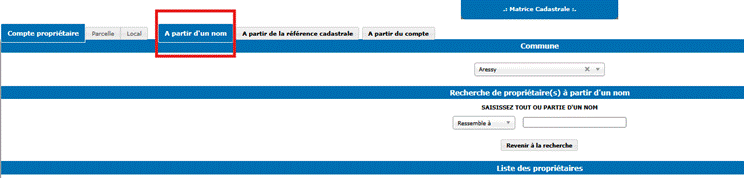
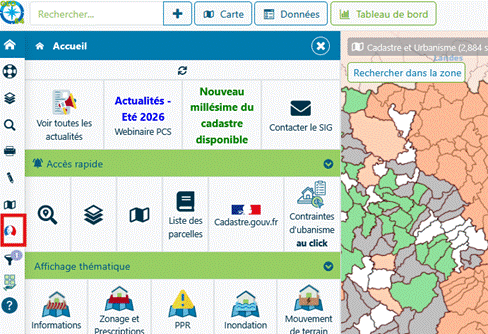
Ouvrez le Matrice Cadastrale (icône Marianne)
<span style="font-size: 11.0pt; font-family: 'Calibri',sans-serif; mso-ascii-theme-font: minor-latin; mso-hansi-theme-font: minor-latin; mso-bidi-font-family: 'Times New Roman'; mso-bidi-theme-font: minor-bidi; mso-fareast-language: EN-US; mso-no-proof: yes;">![](https://filez.apgl64.fr/uploads/images/gallery/2026-10/embedded-image-rzgscme8.png)</span>

<span style="font-size: 11.0pt; font-family: 'Calibri',sans-serif; mso-ascii-theme-font: minor-latin; mso-hansi-theme-font: minor-latin; mso-bidi-font-family: 'Times New Roman'; mso-bidi-theme-font: minor-bidi; mso-fareast-language: EN-US;"> </span>

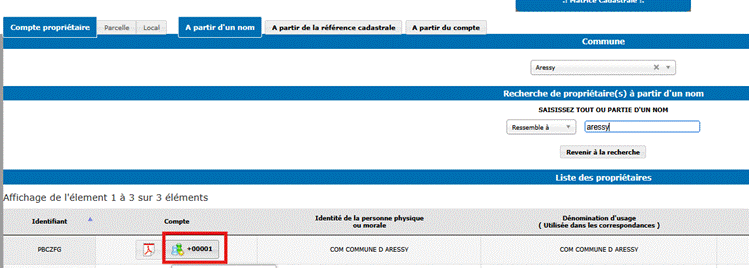
<span style="font-size: 11.0pt; font-family: 'Calibri',sans-serif; mso-ascii-theme-font: minor-latin; mso-hansi-theme-font: minor-latin; mso-bidi-font-family: 'Times New Roman'; mso-bidi-theme-font: minor-bidi; mso-fareast-language: EN-US;">Par défaut, la recherche est sur le nom du propriétaire. Renseignez le nom ou une partie du nom dans la barre de recherche.</span>

<span style="font-size: 11.0pt; font-family: 'Calibri',sans-serif; mso-ascii-theme-font: minor-latin; mso-hansi-theme-font: minor-latin; mso-bidi-font-family: 'Times New Roman'; mso-bidi-theme-font: minor-bidi; mso-fareast-language: EN-US; mso-no-proof: yes;">![](https://filez.apgl64.fr/uploads/images/gallery/2026-10/embedded-image-x61ehixh.png)</span>

<span style="font-size: 11.0pt; font-family: 'Calibri',sans-serif; mso-ascii-theme-font: minor-latin; mso-hansi-theme-font: minor-latin; mso-bidi-font-family: 'Times New Roman'; mso-bidi-theme-font: minor-bidi; mso-fareast-language: EN-US;"> </span>

<span style="font-size: 11.0pt; font-family: 'Calibri',sans-serif; mso-ascii-theme-font: minor-latin; mso-hansi-theme-font: minor-latin; mso-bidi-font-family: 'Times New Roman'; mso-bidi-theme-font: minor-bidi; mso-fareast-language: EN-US;">Vous pouvez ensuite cliquer sur le compte propriétaire qui vous intéresse :</span>

<span style="font-size: 11.0pt; font-family: 'Calibri',sans-serif; mso-ascii-theme-font: minor-latin; mso-hansi-theme-font: minor-latin; mso-bidi-font-family: 'Times New Roman'; mso-bidi-theme-font: minor-bidi; mso-fareast-language: EN-US; mso-no-proof: yes;">![](https://filez.apgl64.fr/uploads/images/gallery/2026-10/embedded-image-x5j6us89.png)</span>

<span style="font-size: 11.0pt; font-family: 'Calibri',sans-serif; mso-ascii-theme-font: minor-latin; mso-hansi-theme-font: minor-latin; mso-bidi-font-family: 'Times New Roman'; mso-bidi-theme-font: minor-bidi; mso-fareast-language: EN-US;"> </span>

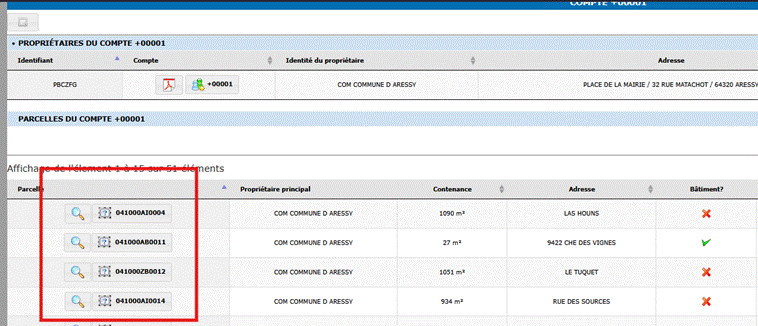
<span style="font-size: 11.0pt; font-family: 'Calibri',sans-serif; mso-ascii-theme-font: minor-latin; mso-hansi-theme-font: minor-latin; mso-bidi-font-family: 'Times New Roman'; mso-bidi-theme-font: minor-bidi; mso-fareast-language: EN-US;">Et accéder à la liste des parcelles associées :</span>

<span style="font-size: 11.0pt; font-family: 'Calibri',sans-serif; mso-ascii-theme-font: minor-latin; mso-hansi-theme-font: minor-latin; mso-bidi-font-family: 'Times New Roman'; mso-bidi-theme-font: minor-bidi; mso-fareast-language: EN-US; mso-no-proof: yes;">![](https://filez.apgl64.fr/uploads/images/gallery/2026-10/embedded-image-adnovuej.png)</span>

<span style="font-size: 11.0pt; font-family: 'Calibri',sans-serif; mso-ascii-theme-font: minor-latin; mso-hansi-theme-font: minor-latin; mso-bidi-font-family: 'Times New Roman'; mso-bidi-theme-font: minor-bidi; mso-fareast-language: EN-US;"> </span>

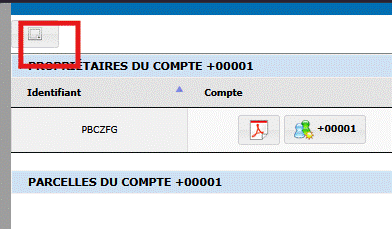
<span style="font-size: 11.0pt; font-family: 'Calibri',sans-serif; mso-ascii-theme-font: minor-latin; mso-hansi-theme-font: minor-latin; mso-bidi-font-family: 'Times New Roman'; mso-bidi-theme-font: minor-bidi; mso-fareast-language: EN-US;">La loupe vous permet de vous localiser sur Géo64 et le petit carré gris de choisir une couleur pour colorier les parcelles de ce propriétaire sur Géo64</span>

<span style="font-size: 11.0pt; font-family: 'Calibri',sans-serif; mso-ascii-theme-font: minor-latin; mso-fareast-font-family: Calibri; mso-fareast-theme-font: minor-latin; mso-hansi-theme-font: minor-latin; mso-bidi-font-family: 'Times New Roman'; mso-bidi-theme-font: minor-bidi; mso-ansi-language: FR; mso-fareast-language: EN-US; mso-bidi-language: AR-SA; mso-no-proof: yes;">![](https://filez.apgl64.fr/uploads/images/gallery/2026-10/embedded-image-zw12ho1o.png)</span>